Self-hosted · business app platform
One front door to the business apps you run yourself.
Seamnex installs, manages and audits the open-source business apps a small company runs — on your hardware, with no SaaS dependency.
- EspoCRMNative SSO
- MauticAutomated sign-in
- ERPNextNative SSO
- OrangeHRMAutomated sign-in
- OpenProjectAutomated sign-in
- MetabaseAutomated sign-in
Every app. Every login. One person.
That is the stack before a platform: every tool with its own account, its own access list and its own backup story — held together by the one person who also has a day job.
| The usual arrangement | With Seamnex |
|---|---|
| One login per app | One sign-in, one portal |
| Each app fitted and wired by hand | Deploy from a tagged catalogue |
| Access decided inside each app | Roles set once, enforced at the edge |
| No record of who changed what | A log of every change |
| Rebuilds done from memory | Backups and restores you can verify |
| Data on someone else's servers | Your hardware, your data |
| A dashboard for containers | A platform for the applications themselves |
One portal for every app. 2 of the 6 catalogue apps use native SSO; the rest are signed in automatically.
What runs on it
The catalogue covers the work a small company runs on — sales, marketing, operations, people, projects and reporting. Seamnex ships none of these apps itself; they live in a separate, tagged repository, and an app that keeps its own account is signed in automatically rather than presented as single sign-on.
| App | Used for | Sign-in |
|---|---|---|
| EspoCRM | CRM and sales | Native SSO |
| Mautic | Marketing and leads | Automated sign-in |
| ERPNext | ERP and operations | Native SSO |
| OrangeHRM | HR and people | Automated sign-in |
| OpenProject | Projects and work | Automated sign-in |
| Metabase | Reporting and data | Automated sign-in |
2 of 6 use native SSO. The rest are signed in automatically by the platform’s sign-in relay.
The console for the person who runs it
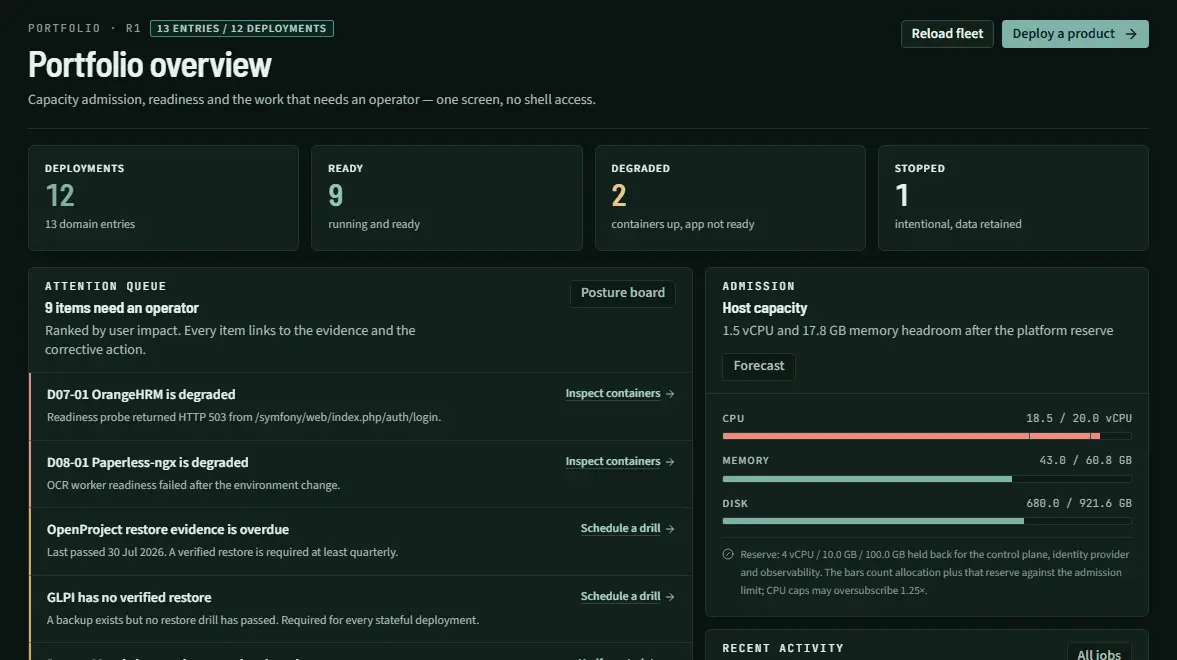
Seamnex installs and manages the apps, and gives the operator one place to see what is running, who can reach it, and what changed.
- 01
One portal, one link
Staff get one link instead of one per app. An app with native SSO inherits the platform sign-in; one without is signed in automatically by the platform’s sign-in relay.
- 02
Roles at the edge
Access is set once and enforced in front of every app — including the ones whose sign-in is relayed.
- 03
An audit trail
Every change is recorded, so “who did that?” has an answer six months later.
- 04
Upgrades you plan
Apps run from tagged catalogue releases, so a version change is a step you choose and can repeat.
Data moves without custom code
Seamnex installs and manages the apps, then carries the records between them. The workflow engine runs on your own host, inside the same stack, so a connection between two apps stays on your hardware.
- 01
Install
Deploy an app from the catalogue, pinned to a tagged release, so the version you run is a version you chose.
- 02
Connect
Name the fields once. The platform keeps the mapping between the two apps.
- 03
Automate
Records move between apps on their own, without a script to maintain at each end.
Your hardware. Your data. A log of every change.
Seamnex runs on hardware you control, with no SaaS dependency, and the apps it manages keep their own licences.
Your hardware
The platform and its data live on machines you control, not in a vendor account.
No SaaS dependency
Nothing in the path requires a subscription to someone else’s service.
Every change audited
The console keeps a log of who changed what, so history survives staff turnover.
Restores you can verify
Backups are only useful if a restore works; that check belongs in the console.
“Small companies (up to 250 staff) that would rather run their own tools than rent them.”
Start on a host you control
Three prerequisites — Node.js 24, pnpm through Corepack and Docker with Compose v2 — on a Linux host with 4 vCPU, 8 GB RAM and 40 GB free.
git clone https://github.com/orbivort/seamnex
cd seamnex
corepack enable pnpm
pnpm bootstrap
pnpm bootstrap installs the platform, brings the stack up and waits until the API reports ready. It is safe to run twice.
It does not fetch the catalogue. Use Catalog → “Sync from source” in the console, orpnpm catalog:sync with a tag, to load the apps.
See it running before you install it.
The demo is the shortest path to the portal and the operator console.